You want context beside the signal.
Use levels, trend, market structure and risk fields to examine an idea before deciding what to do.
3 chart systems · TradingView + MT4 + MT5
Pro Suite puts reaction levels, market context and risk information beside the signal—so you can judge the idea, define its limits and make your own decision.
Billed $399 annuallySave 52% vs monthly
$399 charged today. Renews annually. Cancel future renewals in Billing.
Get Pro Suite — annual accessSecure Stripe checkout · Access sent to your email
Decision-support tools · No automated execution · Signals can fail
Explore the tools
Choose a system to see its real interface and the information it brings to your chart. Each works independently.
Price Reaction Levels
Map potential reaction levels, then inspect the trend and setup context around them. The trade panel keeps the current plan’s information on the chart.
See the horizontal levels alongside price. Use them as references when deciding which areas deserve attention.
Read the trend, market state and setup grade together, instead of judging a marker in isolation.
Keep the current position, next target, size and risk information in the same chart view.
DisruptNEX
Pressure zones show the local picture. The Market Structure panel puts several timeframes beside it, helping you see agreement or mixed conditions.
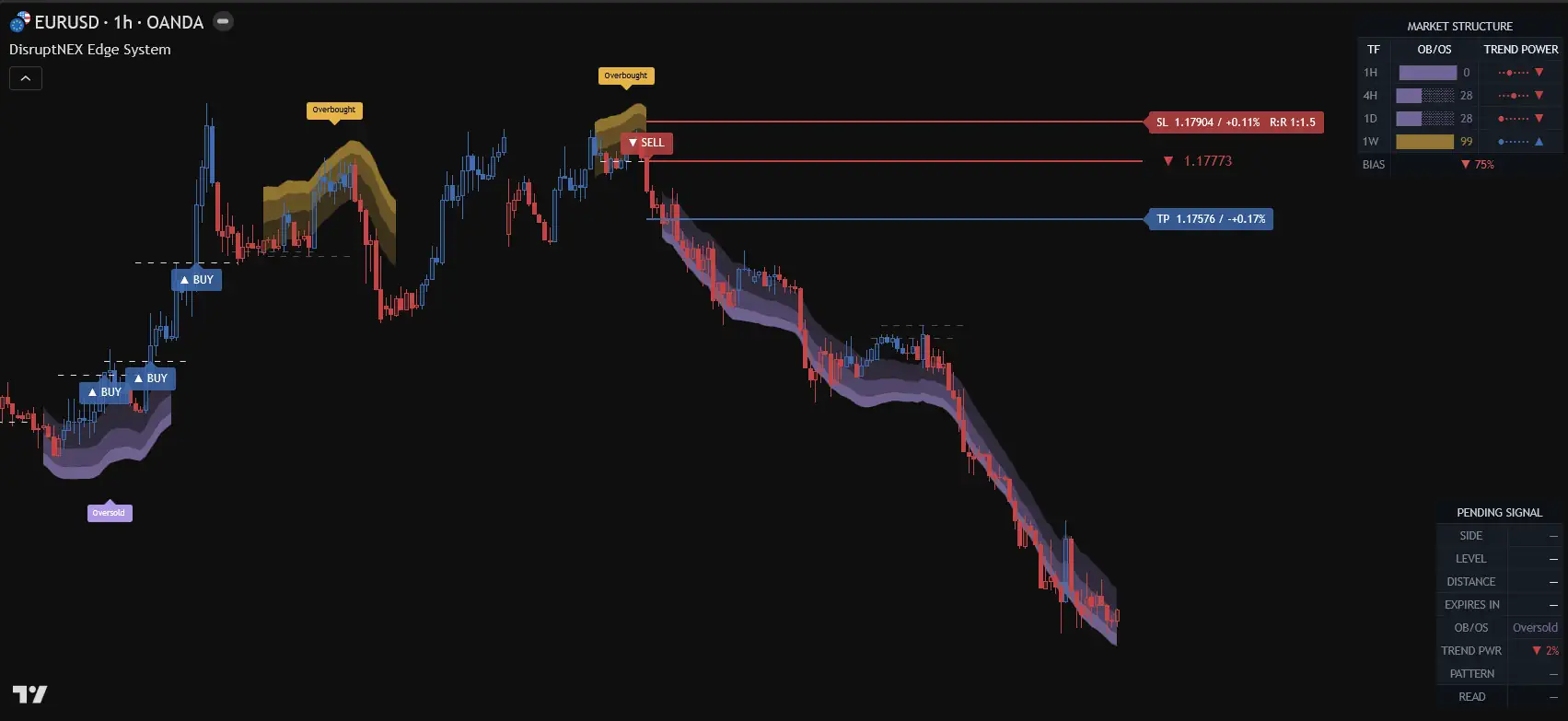
Follow the coloured pressure zones alongside price and the indicator’s buy/sell markers.
Compare the timeframe rows in the Market Structure panel without switching away from this chart.
Inspect the plotted entry, stop and target references together, while the surrounding price action stays visible.
PRO Swing
See the channel, trade-plan fields and trend strength together. Position-size and stop/target planning stay visible as you assess the idea.
Follow the channel and its midline through changes in direction. The price history remains visible around the signal.
Locate the plotted stop and target on the chart, so the plan’s boundaries are visible alongside price.
Review the risk and position-size fields with the trend-strength panel before deciding how to use the setup.
All three systems are included.TradingView, MetaTrader 4 and MetaTrader 5 editions.
Choose your access →Before you subscribe
Pro Suite is built for self-directed traders who want more information around a setup—not a black box that promises the next trade.
Use levels, trend, market structure and risk fields to examine an idea before deciding what to do.
PRL, DisruptNEX and PRO Swing work independently. Learn the one closest to your process; the others remain available.
TradingView, MT4 and MT5 editions are included. Custom MT indicators run in the desktop platforms.
That is not what Pro Suite sells. The systems provide chart analysis and planning information; the trading decision stays with you.
Why the suite
Choose the system closest to your trading process. Your subscription keeps the other approaches, supported platforms and shared tools available when you need them.
Reaction levels with PRL. Intraday pressure with DisruptNEX. Channel and risk planning with PRO Swing. Explore the others when you have a reason to.
TradingView, MT4 and MT5 editions are included. Follow the guide for your platform; interfaces differ between editions.
One place to manage access, download packages, open guides and get support. Annual and monthly include the same access.
Included beyond the chart
Buying the tools is the beginning. Your Client Area brings access, installation guides and billing together, with help when you need it.
AI Radar · Included
Review recorded indicator conditions and their later outcomes alongside your chart research.
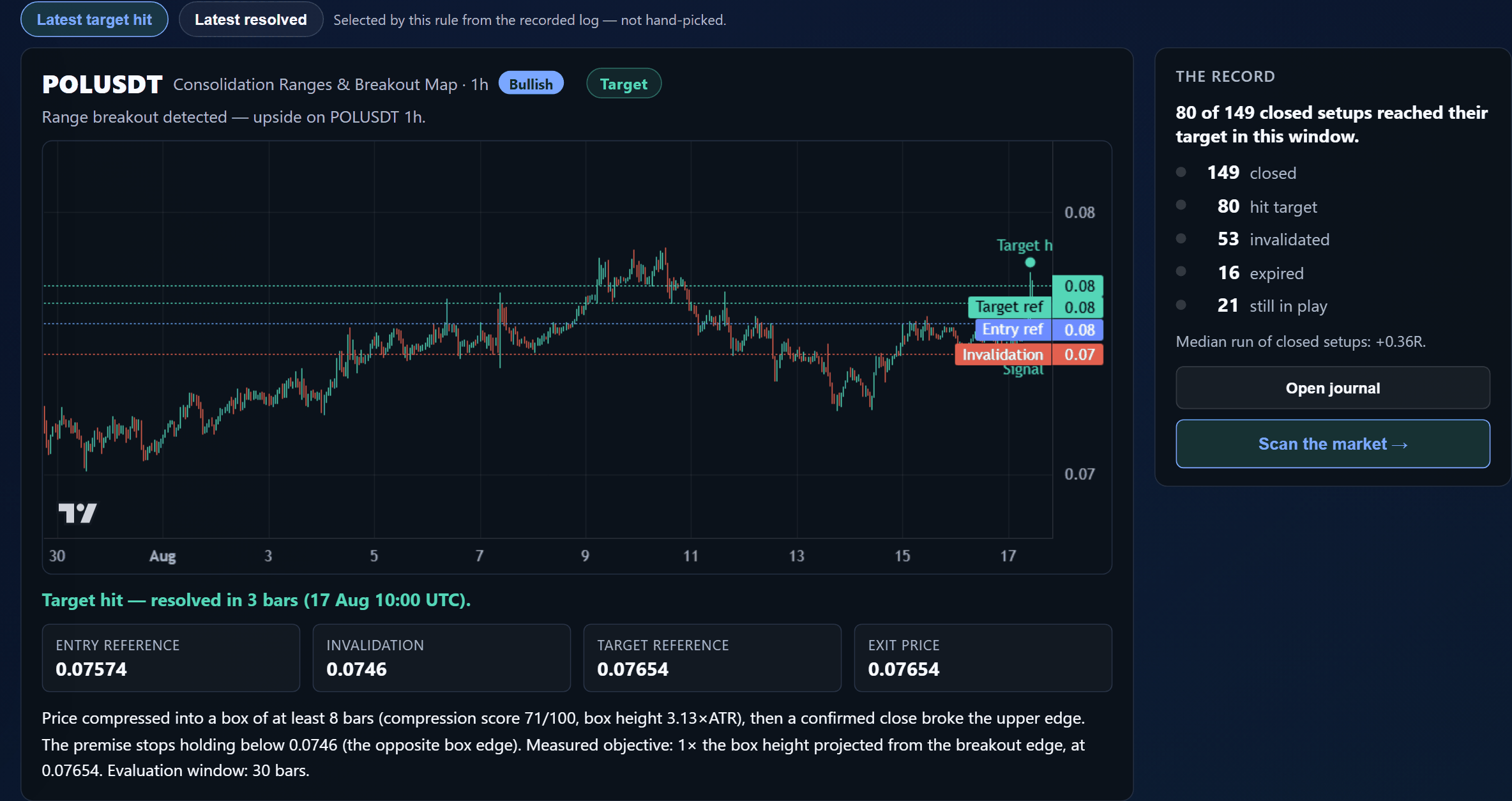
Chart examples illustrate product features, not live signals or expected returns. Trading involves risk.
From verified customer correspondence
The strongest thread in earlier customer feedback was practical clarity: understanding what the indicator shows, then getting a direct answer when setup or access gets in the way.
“Straight away that gives a much clearer representation of what the indicator is doing. Thank you very much.”
Gary H.DisruptNEX Bundle · United Kingdom
“Thank you for such a prompt reply and a clear explanation! I followed your instructions, and it worked.”
Paul F.Price Reaction Levels · United States
“This was so easily resolved. Absolutely no confusion whatsoever.”
Lloyd B.DisruptNEX Bundle · Canada
Quotes from customer support letters; purchases verified and originals retained. Lightly edited for clarity. Individual product and support experiences, not evidence of trading performance.
Your Pro Suite access
The same tools and access, with annual or monthly billing. TradingView, MetaTrader 4 and MetaTrader 5 editions are included.
Pro Suite · Annual
Billed $399 annuallySave 52% vs monthly
$399 charged today. Renews annually. Cancel future renewals in Billing.
Get Pro Suite — annual accessPrices in US dollars · Secure Stripe checkout
Platform editions have their own interfaces. The product examples on this page show TradingView.
After payment
Before you subscribe
It is designed for self-directed traders who already make their own decisions and want chart-based context around levels, structure, entries and risk. It is not an automated trading service, a copy-trading product or a promise that every signal will work. If you only need one narrow task, a standalone product may be enough.
The suite makes sense when you want several analytical approaches, more than one platform, or the supporting services in one subscription. For a single task, an individual product may be enough. Each system works independently; start with the one closest to your process.
Annual access costs $399 today and renews every year. $33.25 is the monthly equivalent ($399 ÷ 12), not a monthly charge. Twelve monthly payments of $69 total $828, so annual saves $429, approximately 52%. Monthly access is $69 today and renews monthly.
You need a TradingView account to use the TradingView editions. Any TradingView plan or market-data subscription is separate from Pro Suite. Choose a TradingView plan that supports the chart features and indicator limits you need.
Custom MT4 and MT5 indicators run in the desktop platforms, not in the MetaTrader mobile apps. The TradingView editions use your TradingView account. Follow the setup guide for your chosen platform.
The indicators display analytical conditions and planning levels. They do not execute trades or make decisions for you. Signals can fail, and setup grades are not probabilities of profit. Read the product guides to understand each system’s behaviour and limitations.
Check the product, platform and term of your existing access in the Client Area before subscribing. A separate lifetime licence remains separate; Pro Suite is recurring access to the included tools and services. The suite may be useful if you need additional systems or platforms.
This is a direct MQLSoftware subscription, managed through Stripe and your Client Area. TradingView Paid Space is a separate purchase channel with its own access and billing. Do not buy the same access twice; contact support if you are unsure what you already have.
The free Member Hub has its own tools and guides. Pro Suite is the paid subscription shown on this page; free registration does not require buying it.
Cancel future renewals in Billing. Subscription access normally continues until the end of your paid period. Any separate lifetime licence you own remains yours. Refund requests follow the published refund policy.
TradingView + MetaTrader · AI Radar · Client Area
Billed $399 annuallySave 52% vs monthly
$399 charged today. Renews annually. Cancel future renewals in Billing.